

Firebase: Sign-In Authentication Using Phone Number FIREBASE
- Firebase Tutorial
- Features of Firebase
- Android Studio
- Firebase - Environment Setup (with android studio)
- Firebase Assistance - Android Studio
- Firebase Authentication
- Firebase: Google Sign-In Authentication
- Firebase: Facebook Sign-In Authentication
- Firebase: Sign-In Authentication Using Phone Number
- Firebase UI: Authentication using email/password
- Firebase UI: Authentication using email link
- Firebase SDK: Authentication using email/password
- Firebase SDK: Authentication using the email link
- Firebase: Realtime Database
- Firebase: Real-time database setup and configuration
- Firebase: Data Organization in Real-time Database
- Firebase: Realtime Database Reading and Writing
- Firebase: Realtime Database Update and Delete
Firebase: Sign-In Authentication Using Phone Number
Sign-In Authentication Using Phone Number
We can use Firebase authentication to the sign-in user by sending a text message to the user's phone. The user will sign-in using a one-time code that they have received in their message box.
Starting steps are the same, such as creating a Firebase project, creating an Android Studio project, adding firebase to our Android app, adding firebase-auth and firebase-core dependencies, adding SHA-1 and SHA-256 keys, add JSON file, and apply plugins. for reference first read Firebase: Google Sign-In Authentication or Firebase: Facebook Sign-In Authentication.
The next steps are to enable phone number authentication in Firebase console. After these preliminary steps, we have to perform the following steps:
Step1:
Now, we will add permission to use the Internet in our Manifest file.
Step2:
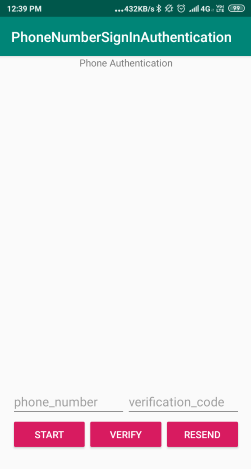
Now, we will modify our 'activity_main.xml' file for phone number authentication. The layout design will be as followed:
Step3:
Now, add code for the phone number authentication. and modify your 'MainActivity.java' file. Below is the code for the phone number authentication.
//Implementing onClickListenerpublic class MainActivity extends AppCompatActivity implements View.OnClickListener {private static final String TAG = "PhoneAuthActivity";//Adding a member variable for the key verification in progressprivate static final String KEY_VERIFY_IN_PROGRESS = "key_verify_in_progress";//Creating FirebaseAuth member variableprivate FirebaseAuth mAuth;//Adding a bunch of member variables for view groups, edit text, and buttons.private ViewGroup mPhoneNumberViews;private ViewGroup mSignedInViews;private EditText mPhoneNumberField;private EditText mVerificationField;private Button mStartButton;private Button mVerifyButton;private Button mResendButton;private Button mSignOutButton;//Setting Boolean to say whether or not we are in progress.private boolean mVerificationInProgress = false;//Adding verification id as a member variable.private String mVerificationId;//Adding a member variable for PhoneAuthProvider.ForceResendingToken callback.private PhoneAuthProvider.ForceResendingToken mResendToken;//Adding a member variable for a callback which is our PhoneAuthProvider.OnVerificationStateChangeCallbacks.private PhoneAuthProvider.OnVerificationStateChangedCallbacks mCallbacks;@Overrideprotected void onCreate(Bundle savedInstanceState) {super.onCreate(savedInstanceState);setContentView(R.layout.activity_main);// Restoring the instance stateif (savedInstanceState != null) {onRestoreInstanceState(savedInstanceState);}// Assigning all the viewsmPhoneNumberViews = findViewById(R.id.phoneAuthFields);mSignedInViews = findViewById(R.id.signedInButtons);mPhoneNumberField = findViewById(R.id.fieldPhoneNumber);mVerificationField = findViewById(R.id.fieldVerificationCode);mStartButton = findViewById(R.id.buttonStartVerification);mVerifyButton = findViewById(R.id.buttonVerifyPhone);mResendButton = findViewById(R.id.buttonResend);mSignOutButton = findViewById(R.id.signOutButton);// Setting all the click listenersmStartButton.setOnClickListener(this);mVerifyButton.setOnClickListener(this);mResendButton.setOnClickListener(this);mSignOutButton.setOnClickListener(this);// Initialize Firebase AuthmAuth = FirebaseAuth.getInstance();// Initializing phone auth callbacks (For verification, Not entering code yet, To get text send to device)mCallbacks = new PhoneAuthProvider.OnVerificationStateChangedCallbacks() {@Overridepublic void onVerificationCompleted(PhoneAuthCredential credential) {// It will be invoked in two situations, i.e., instant verification and auto-retrieval:// 1 - In few of the cases, the phone number can be instantly verified without needing to enter or send a verification code.// 2 - On some devices, Google Play services can automatically detect the incoming verification SMS and perform verification without// user action.Log.d(TAG, "onVerificationCompleted:" + credential);mVerificationInProgress = false;//Calling signInWithPhoneAuthCredential.signInWithPhoneAuthCredential(credential);}//Creating onVerificationFailed() method.@Overridepublic void onVerificationFailed(FirebaseException e) {// It is invoked when an invalid request is made for verification.//For instance, if the phone number format is not valid.Log.w(TAG, "onVerificationFailed", e);mVerificationInProgress = false;if (e instanceof FirebaseAuthInvalidCredentialsException) {// Invalid request// Setting error to text fieldmPhoneNumberField.setError("Invalid phone number.");} else if (e instanceof FirebaseTooManyRequestsException) {// The SMS quota has been exceeded for the projectToast.makeText(getApplicationContext(), "Quota exceeded", Toast.LENGTH_SHORT).show();}}// Creating onCodeSent() method called after the verification code has been sent by SMS to the provided phone number.@Overridepublic void onCodeSent(String verificationId,PhoneAuthProvider.ForceResendingToken token) {// The SMS verification code will be sent to the provided phone number// Now need to ask the user for entering the code and then construct a credential// through integrating the code with a verification ID.Log.d(TAG, "onCodeSent:" + verificationId);// Save the verification ID and resend token to use them latermVerificationId = verificationId;mResendToken = token;}};}// Creating onStart method.@Overridepublic void onStart() {super.onStart();// Checking if the user is signed in or not. If signed in, then update UI accordingly.FirebaseUser currentUser = mAuth.getCurrentUser();if (currentUser != null) {Log.d(TAG, "Currently Signed in: " + currentUser.getEmail());Toast.makeText(MainActivity.this, "Currently Logged in: " + currentUser.getEmail(), Toast.LENGTH_LONG).show();mPhoneNumberViews.setVisibility(View.GONE);mSignedInViews.setVisibility(View.VISIBLE);}else {mPhoneNumberViews.setVisibility(View.VISIBLE);mSignedInViews.setVisibility(View.GONE);}//check if a verification is in progress. If it is then we have to re verify.if (mVerificationInProgress && validatePhoneNumber()) {startPhoneNumberVerification(mPhoneNumberField.getText().toString());}}//Implementing SaveInstanceState to save the flag.@Overrideprotected void onSaveInstanceState(Bundle outState) {super.onSaveInstanceState(outState);outState.putBoolean(KEY_VERIFY_IN_PROGRESS, mVerificationInProgress);}//Implementing RestoreInstanceState to restore the flag.@Overrideprotected void onRestoreInstanceState(Bundle savedInstanceState) {super.onRestoreInstanceState(savedInstanceState);mVerificationInProgress = savedInstanceState.getBoolean(KEY_VERIFY_IN_PROGRESS);}// Creating startPhoneNumberVerification() method//Getting text code sent. So we can use it to sign-in.private void startPhoneNumberVerification(String phoneNumber) {PhoneAuthProvider.getInstance().verifyPhoneNumber(phoneNumber, // Phone number to verify60, // Timeout durationTimeUnit.SECONDS, // Unit of timeoutthis, // Activity (for callback binding)mCallbacks); // OnVerificationStateChangedCallbacks//Setting flag to say that the verification is in process.mVerificationInProgress = true;}//Creating a helper method for verification of phone number with code.// Entering code and manually signing in with that codeprivate void verifyPhoneNumberWithCode(String verificationId, String code) {PhoneAuthCredential credential = PhoneAuthProvider.getCredential(verificationId, code);signInWithPhoneAuthCredential(credential);}// Creating helper method signInWithPhoneAuthCredential().//Use text to sign-in.private void signInWithPhoneAuthCredential(PhoneAuthCredential credential) {//Adding onCompleteListener to signInWithCredential.mAuth.signInWithCredential(credential).addOnCompleteListener(this, new OnCompleteListener<AuthResult>() {@Overridepublic void onComplete(@NonNull Task<AuthResult> task) {if (task.isSuccessful()) {//Sign-In is successful, update the UI with the signed-in user's informationLog.d(TAG, "signInWithCredential:success");FirebaseUser user = task.getResult().getUser();mPhoneNumberViews.setVisibility(View.GONE);mSignedInViews.setVisibility(View.VISIBLE);} else {// If the SignIn fails, it will display a message and also update the UILog.w(TAG, "signInWithCredential:failure", task.getException());if (task.getException() instanceof FirebaseAuthInvalidCredentialsException) {// The verification code entered was invalidmVerificationField.setError("Invalid code.");}}}});}// Creating helper method for validating phone number.private boolean validatePhoneNumber() {String phoneNumber = mPhoneNumberField.getText().toString();if (TextUtils.isEmpty(phoneNumber)) {mPhoneNumberField.setError("Invalid phone number.");return false;}return true;}//Creating helper method for resending verification code.private void resendVerificationCode(String phoneNumber,PhoneAuthProvider.ForceResendingToken token) {PhoneAuthProvider.getInstance().verifyPhoneNumber(phoneNumber, // Phone number to verify60, // Timeout durationTimeUnit.SECONDS, // Unit of timeoutthis, // Activity (for callback binding)mCallbacks, // OnVerificationStateChangedCallbackstoken); // ForceResendingToken from callbacks}//Adding onClick method which handles the button clicks.@Overridepublic void onClick(View view) {switch (view.getId()) {case R.id.buttonStartVerification:if (!validatePhoneNumber()) {return;}//Calling startPhoneNumberVerification helper method for verifying phone number.startPhoneNumberVerification(mPhoneNumberField.getText().toString());break;case R.id.buttonVerifyPhone:String code = mVerificationField.getText().toString();if (TextUtils.isEmpty(code)) {mVerificationField.setError("Cannot be empty.");return;}//Call the verifyPhoneNumberWithCode () method.verifyPhoneNumberWithCode(mVerificationId, code);break;case R.id.buttonResend://Call the resendVerificationCode () method.resendVerificationCode(mPhoneNumberField.getText().toString(), mResendToken);break;case R.id.signOutButton://Call the signOut() method.signOut();break;}}//Create the signOut() method.private void signOut() {mAuth.signOut();mPhoneNumberViews.setVisibility(View.VISIBLE);mSignedInViews.setVisibility(View.GONE);}}

#askProgrammers Learn Programming for Free
Join Programmers Community on Telegram

Talk with Experienced Programmers

Just drop a message, we will solve your queries
